Skip to content

From Clicks to Clients: 5 Lead Nurture Journeys MSPs Should Automate
Many MSPs are great at generating interest clicks, webinar sign-ups, and form fills, but few consistently turn those touches into revenue. Leads go cold, quotes get buried in inboxes, and renewals slip through the cracks.
The problem isn’t effort; it’s orchestration. Most MSPs handle nurture manually, relying on follow-up reminders and spreadsheets. That approach doesn’t scale. You need automation that moves prospects and clients through each stage of your revenue engine from first click to renewal.
Empellor CRM’s MSP Revenue Flywheel research found that MSPs automating their lead and renewal journeys see 30 to 40 percent higher conversion rates than those depending on ad hoc communication. When automation handles the routine, your team can focus on what actually grows the business, closing deals and deepening relationships.
Quick Takeaway: Automate the Journey, Not Just the Message
Referrals eventually dry up. Automation keeps your pipeline alive.
By automating five key nurture journeys inside your CRM, you convert attention into opportunities and opportunities into revenue.
Every message, follow-up, quote, and renewal should sync across Dynamics 365, Experlogix CPQ, Work 365, and Power BI, with insights reviewed during your Quarterly Growth Review (QGR).
Snippet-ready summary:
Automated nurture turns interest into predictable revenue. Build these five CRM-connected journeys, track them in your QGR, and your MSP growth becomes consistent and scalable.
Why Nurture Is the Missing Link in MSP Growth
Most MSPs don’t lose revenue because they can’t find leads; they lose it because they don’t follow up fast enough or long enough with their lead nurturing strategies. Deals stall, demos no-show, renewals go unnoticed, and quotes sit unanswered.
These are the real leaks that drain pipeline performance for the sales team:
- Slow or missed follow-ups after form fills or demos
- Prospects who “went dark” after initial interest
- Manual renewals handled in spreadsheets
- Proposals stuck in email threads with no tracking
Nurture isn’t about sending “more emails.” It’s about stage-by-stage automation that connects your CRM, CPQ, and renewal tools, so every lead and client is guided to the next logical step.
In Empellor CRM’s Revenue Flywheel framework, nurture is what closes the loop between marketing and sales. It ensures that no opportunity dies quietly and no renewal slips away unnoticed.
When nurture lives inside your CRM, it stops being marketing fluff and becomes part of your MSP revenue engine, measurable, repeatable, and scalable.
Quick Takeaway:
Nurture isn’t noise; it’s structure. When automated, it turns leads into meetings, meetings into clients, and clients into recurring revenue.
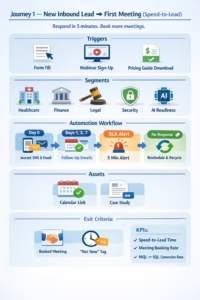
Journey 1 — New Inbound Lead → First Meeting (Speed-to-Lead)
Your fastest wins happen right after someone raises their hand. When a prospect downloads a guide, attends a webinar, or requests pricing, your follow-up speed determines whether that lead becomes a meeting or disappears forever.
Research shows that responding within five minutes increases qualification rates by more than 8×. Yet most MSPs take hours or even days. Automation fixes that by automating lead nurturing.
Trigger:
- Form fill, webinar sign-up, or pricing guide download.
Segments:
- By industry (healthcare, finance, legal).
- By problem theme (security, compliance, AI readiness).
Assets:
- Thank-you page with embedded calendar link.
- Three-part “what to expect” email mini-series.
- One-pager tailored by vertical.
- Relevant case study.
Cadence:
- Day 0: Immediate SMS and email follow-up; route to account executive.
- Days 1, 3, 7: Follow-up reminders and nurture touches with calendar link.
- Automation: SLA alert if no first-touch within five minutes; reschedule and recycle automatically if no response.
Exit Criteria:
- Booked meeting or “not now” tag added with future recycle date.
KPIs:
- Speed-to-lead response time
- Meeting booking rate
- MQL → SQL conversion rate
Leads are perishable. Automate your first-touch sequence so no one waits and no opportunity goes stale. Make your first email answer “What happens next?” — this structure helps capture snippet-style visibility for conversion-related searches.
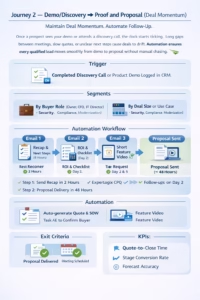
Journey 2 — Demo/Discovery → Proof and Proposal (Deal Momentum)
Once a prospect sees your demo or attends a discovery call, the clock starts ticking. This is where many MSPs lose momentum — long gaps between meetings, slow quotes, or unclear next steps cause deals to drift.
Automation ensures every qualified lead moves smoothly from demo to proposal without manual chasing.
Trigger:
- Completed discovery call or product demo logged in CRM.
Segments:
- By buyer role (owner, CFO, IT director) in your lead generation efforts.
- By deal size or use case (security, compliance, modernization).
Assets:
- Email 1: Meeting recap with bullet-point takeaways and next steps.
- Email 2: Tailored SOW checklist and ROI calculator.
- Email 3: Short video showing the exact feature or workflow discussed.
Cadence:
- Sending a recap within 2 hours can be critical for automating lead nurturing. of demo.
- Proposal delivery within 48 hours using Experlogix CPQ.
- Follow-ups on Day 2 and Day 5 in the customer journey with value reframes or proof points.
Automation:
- Auto-generate quote and SOW from CPQ templates.
- Task AE to confirm the economic buyer and the next meeting date.
- If no movement after 7 days, auto-alert the manager for intervention.
Exit Criteria:
- Proposal delivered and meeting scheduled to review it.
KPIs:
- Quote-to-close time
- Stage conversion rate
- Forecast accuracy
Proposals lose power with delay. Automate recap, quote creation, and proposal follow-up so deals never stall in the inbox. MSPs using automated quote workflows see sales cycles 20 to 30 percent shorter and improved margin control compared to manual quoting.
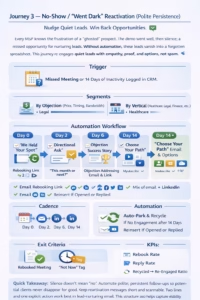
Journey 3 — No-Show / “Went Dark” Reactivation (Polite Persistence)
Every MSP knows the frustration of a “ghosted” prospect. The demo went well, then silence; a missed opportunity for nurturing leads. Or worse, the prospect never showed up at all. Without automation, these leads vanish into a forgotten spreadsheet. With the right workflow, you can bring them back.
This journey re-engages quiet leads with empathy, proof, and options, not spam.
Trigger:
- Missed meeting or 14 days of inactivity logged in Dynamics 365.
Segments:
- By objection (price, timing, bandwidth).
- By vertical (healthcare, legal, finance, etc.).
Assets:
- “We held your spot” email with a new lead. calendar rebooking link.
- A short “directional ask” email (“Should we reconnect this month or next?”) can be part of your lead nurturing workflow.
- One brief success story addressing their objection.
- “Choose your path” email: book now, explore resources, or unsubscribe.
Cadence:
- Day 0, 2, 6, and 14 (mix of email + LinkedIn message).
Automation:
- Auto-park after 14 days of no engagement and recycle into a quarterly newsletter.
- Reinsert into nurture if opened or replied.
- Trigger task if prospect re-engages.
Exit Criteria:
- Rebooked meeting or marked “not now” with recycle date.
KPIs:
- Rebook rate
- Reply rate
- Recycled → re-engaged ratio
Quick Takeaway:
Silence doesn’t mean “no.” Automate polite, persistent follow-ups so potential clients never disappear for good.
Keep reactivation messages short and scannable. Two lines and one explicit action work best in a lead-nurturing email. This structure also helps capture the visibility of featured snippets for “follow-up” queries.
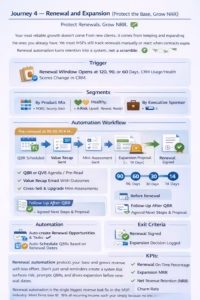
Journey 4 — Renewal and Expansion (Protect the Base, Grow NRR)
Your most reliable growth doesn’t come from new clients; it comes from keeping and expanding the ones you already have. Yet most MSPs still track renewals manually or react when contracts expire. Renewal automation turns retention into a system, not a scramble.
Trigger:
- Renewal window opens at 120, 90, or 60 days, or when usage or health scores change in CRM.
Segments:
- By product mix (M365, security stack, compliance).
- By risk level (healthy, at-risk, upsell-ready).
- By the presence of an executive sponsor or decision-maker.
Assets:
- QBR or QVR agenda and pre-read.
- “Value recap” email summarizing outcomes and metrics achieved.
- Cross-sell or upgrade mini-assessments (security gap, compliance, AI readiness).
- Tailored expansion offer or case study.
Cadence:
- 90, 60, 30, and 14 days before renewal.
- Follow-up after QBR with agreed next steps and new proposals.
Automation:
- Auto-create renewal opportunities and tasks in Work 365.
- Auto-schedule QBRs based on renewal dates.
- Trigger alerts for at-risk accounts.
- Sync renewal and upsell data to Power BI dashboards for visibility.
Exit Criteria:
- Renewal signed, and any expansion decision logged.
KPIs:
- Renewal on-time percentage
- Expansion MRR
- Net Revenue Retention (NRR) can be improved by implementing effective lead nurturing campaigns.
- Churn rate
Renewal automation protects your base and grows revenue with less effort. Don’t just send reminders—create a system that surfaces risk, prompts QBRs, and drives expansion before renewal dates.
Renewal automation is the single biggest revenue leak fix in the MSP industry. Most firms lose 10–15% of recurring income each year simply because no one owns the renewal workflow.
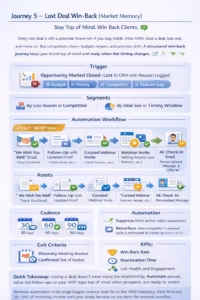
Journey 5 — Lost Deal Win-Back (Market Memory)
Every lost deal is still a potential future win if you stay visible. Most MSPs close a deal, lose one, and move on. But competitors churn, budgets reopen, and priorities shift. A structured win-back journey keeps your brand top of mind and ready when the timing changes.
Trigger:
- Opportunity marked Closed–Lost with a reason logged (budget, timing, competitor, or feature gap) to nurture your leads.
Segments:
- By loss reason or competitor.
- By deal size or timing window.
Assets:
- “We wish you well” email that thanks them for their time and invites them to stay connected.
- 60–90 day follow-up with new proof (updated case study or feature release).
- Webinar invite addressing the topic tied to why you lost (for example, security, compliance, or AI efficiency).
- Personalized “check-in” message from AE with new ROI insight or relevant offer.
Cadence:
- 30, 60, 90, and 180 days post-close.
Automation:
- Suppress from active sales sequences.
- Resurface automatically when the competitor’s renewal cycle is estimated to come up (based on the close date) to enhance your lead nurturing campaign.
- Trigger task for AE to reconnect with refreshed assets.
Exit Criteria:
- New discovery meeting booked or confirmed out of market.
KPIs:
- Win-back rate
- Reactivation time
- List health and engagement
Losing a deal doesn’t mean losing the relationship. Automate periodic, value-led follow-ups so your MSP stays top of mind when prospects are ready to switch. U
Orchestration — Make Journeys Talk to Each Other
Automation only works when the pieces connect. Too often, MSPs build isolated sequences that don’t share data or status updates. That’s how leads fall through the cracks; they finish one journey but never enter the next in the sales funnel.
To fix this, make your CRM the single source of truth for every journey. Dynamics 365 should track each contact’s full lifecycle: from inbound to quote, from quote to renewal, and from renewal to expansion.
Best Practices for Seamless Orchestration
- Centralize all journeys in CRM: Each workflow should trigger the next based on data, not guesswork.
- Standardize sales stages: Keep naming consistent (Lead → Opportunity → Quote → Renewal). This ensures accurate handoffs and reporting.
- Sync automation tools: Connect Experlogix CPQ, Work 365, and Power BI so data flows automatically across sales, billing, and reporting.
- Establish quarterly cleanup: During every Quarterly Growth Review (QGR), prune outdated emails, refresh content, and analyze conversion data.
- Add AI oversight: Use Copilot to summarize journey performance, highlight friction points, and suggest adjustments.
When your journeys “talk,” your data stays clean, your follow-ups stay relevant, and your revenue engine never misses a beat in the lead generation process.
QGRs aren’t just about KPIs; they’re your opportunity to align nurture logic with real customer behavior. Update, refine, and re-launch sequences every quarter for continuous lift.
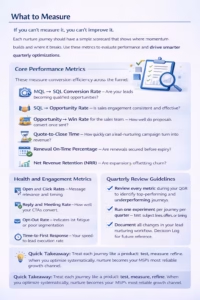
What to Measure
If you can’t measure it, you can’t improve it. Each nurture journey should have a simple scorecard that shows where momentum builds and where it breaks. Use these metrics to evaluate performance and drive smarter quarterly optimizations.
Core Performance Metrics
These measure conversion efficiency across the funnel:
- MQL → SQL Conversion Rate – Are your leads becoming qualified opportunities?
- SQL → Opportunity Rate – Is sales engagement consistent and effective?
- Opportunity → Win Rate for the sales team. – How well do proposals convert once sent?
- Quote-to-Close Time – How quickly can a lead-nurturing campaign turn into revenue?
- Renewal On-Time Percentage – Are renewals secured before expiry?
- Net Revenue Retention (NRR) – Are expansions offsetting churn?
Health and Engagement Metrics
These highlight how audiences interact with your nurture content:
- Open and Click Rates – Message relevance and timing.
- Reply and Meeting Rate – How well your CTAs convert.
- Opt-Out Rate – Indicates list fatigue or poor segmentation.
- Time-to-First Response – Your speed-to-lead execution rate.
Quarterly Review Guidelines
- Review every metric during your QGR to identify top-performing and underperforming journeys.
- Run one experiment per journey per quarter — test subject lines, offers, or timing.
- Document all changes in your lead nurturing workflow. Decision Log for future reference.
Quick Takeaway:
Treat each journey like a product: test, measure, refine. When you optimize systematically, nurture becomes your MSP’s most reliable growth channel.
Implementation Cheatsheet
Here’s a simple framework to help you build or audit any nurture journey. Each one follows the same logic — clear trigger, consistent cadence, measurable outcome.
Use this as your copy-paste template when designing new automations inside Dynamics 365 or Work 365.
Journey Framework
| Step in your nurturing process. | Description | Example for MSPs |
| Trigger | What event starts the journey | Form fill, missed meeting, renewal approaching |
| Segment Rules | Who enters and how they’re grouped | Industry, account size, service bundle, renewal risk |
| Assets | Content pieces used in the journey | Emails, one-pagers, case studies, calculators, videos |
| Cadence | Timing and frequency of touches in your nurturing process. | Day 0, 2, 6, 14 for short sequences; 30–90 days for long-term nurture your leads. |
| Tasks & Automation | CRM actions triggered automatically | Create tasks, schedule follow-ups, update lifecycle stage |
| Exit Criteria | What marks completion in your nurturing efforts? | Booked meeting, proposal delivered, renewal signed |
| KPIs | Metrics to track success | Response rate, meeting rate, quote-to-close time, and NRR in your lead nurturing efforts. |
| Owner | Role accountable for results | Sales lead, CSM, or marketing automation manager |
Writing Rules for Every Journey
- Start with a direct answer — make the first line respond to the prospect’s question.
- Keep content scannable — short sentences, bullets, and bold keywords improve readability and snippet ranking.
- Include an FAQ block at the end — it supports SEO and clarifies common objections.
- Connect to systems — ensure emails, tasks, and alerts sync across Dynamics 365, Experlogix CPQ, HubSpot, and Work 365.
Quick Takeaway:
The best nurture automations follow a formula: trigger, segment, action, measure, repeat. Build them once — then refine quarterly during your QGR.
Automate the Moments That Move Revenue
Clicks don’t pay the bills, but consistent, automated follow-up does. The difference between MSPs that plateau and those that scale is how well they move leads through the pipeline and clients through renewals in their lead nurturing strategies.
When every key touchpoint, first contact, demo, reactivation, renewal, and win-back runs automatically inside your CRM, your business stops relying on memory and starts relying on systems.
Wire each journey into your Dynamics 365 environment, connect quoting and billing through Experlogix CPQ and Work 365, and visualize results in Power BI. Then use Copilot and your Quarterly Growth Review (QGR) cadence to refine what works and replace what doesn’t.
Each of these journeys is a lever in your MSP revenue engine, and when you pull them all together, growth becomes consistent, forecastable, and scalable.
FAQ
Q1: Do we need all five journeys on day one?
No. Start simple. Launch Journey 1 (Speed-to-Lead) and Journey 4 (Renewal and Expansion) first — they protect and grow revenue immediately. Once those run smoothly, layer in nurturing campaigns 2, 3, and 5 to complete your lead nurturing process.
Q2: How often should we update nurture journeys?
Review them quarterly during your QGR. Look at open rates, conversion rates, and deal velocity. Kill what doesn’t move KPIs, refresh content that feels stale, and double down on what drives measurable results.
Q3: Isn’t this just more email marketing?
Not at all. This isn’t about sending more messages — it’s about nurturing efforts. process automation. Each journey connects to quoting, renewals, and service data are essential for effective lead nurturing workflows. inside your CRM so revenue becomes predictable, not accidental, as you build trust.
Q4: How do we know automation is working?
Track speed-to-lead, quote-to-close, and renewal on-time percentage in Power BI. These metrics prove that automation is closing the gaps referrals and manual follow-ups can’t cover.
Quick Takeaway:
You don’t need complexity — you need connection. Automate the right five journeys, measure quarterly, and let your CRM handle the heavy lifting.
Book your MSP Growth Assessment and learn how to implement these five lead nurture automations inside your CRM.
Because CRMShouldntSuck it should turn every click into a client.