Skip to content

How to Keep Your Pipeline Clean and Focused (for MSPs): Turn Win/Loss Analysis into Your Growth Engine
A cluttered pipeline doesn’t just hide your real opportunities, it kills forecasting accuracy and slows revenue momentum. For many MSPs, “busy” pipelines are full of ghosts: stalled deals, duplicate entries, or opportunities that haven’t seen an update in weeks.
Pipeline hygiene isn’t about spreadsheets or micromanagement; it’s about focus. A clean pipeline shows only deals with a genuine buyer, a real next step, and a clear signal of intent. Everything else is noise.
Empellor CRM’s research on MSP sales systems found that firms with structured Win/Loss reviews and pipeline hygiene routines grow 35 percent faster than those running unfiltered lists. Clean data doesn’t just look better, it drives better decisions, sharper forecasts, and faster closes.
This playbook shows how to clean, score, and automate your pipeline and how to use Win/Loss analysis as the steering wheel for your next growth phase.
Quick Takeaway: A Clean Pipeline is a Profitable One
A clean pipeline means every deal has:
- A real next step on the calendar
- A clear decision-maker or buying role
- A recent activity or signal logged in CRM
Run a quarterly Win/Loss analysis to reset your qualify-fast rules, sharpen your focus, and decide which channels and deals deserve attention.
Use the hygiene scorecard and automation recipes in this guide to:
- Remove dead deals automatically
- Prioritize real buyers
- Feed insight back into your sales and marketing playbooks.
A clean MSP pipeline includes only deals with a real next step, a defined buyer, and a recent signal. Quarterly Win/Loss reviews keep your team focused on what closes — not what clutters.
Who This Is For / Not For
For:
- MSP founders and sales leaders who want better forecast accuracy.
- RevOps teams running Dynamics 365 or HubSpot who need cleaner data and faster deal cycles.
- MSPs that already have defined ICPs, services, and recurring revenue models.
Not For:
- Break-fix shops or one-person IT providers without a target market or service catalog.
- Teams that still track sales on spreadsheets instead of CRM.
- Organizations not ready to run structured Quarterly Growth Reviews (QGRs) or Win/Loss Analysis.
This playbook is built for MSPs running a real sales operation — not just managing tickets or reacting to referrals. If you have a CRM and a defined ICP, you’re ready to make your pipeline your most reliable growth tool.
What is “Pipeline Cleanliness”
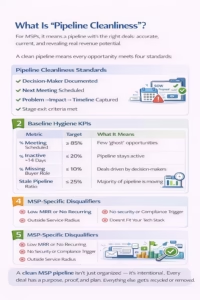
For MSPs, pipeline cleanliness isn’t about having fewer deals — it’s about having the right deals that accurately reflect where revenue is coming from and what’s at risk.
A clean pipeline means every opportunity meets four standards:
- Documented buying role — you know who the decision-maker is.
- Next meeting on the calendar — every deal has a scheduled follow-up.
- Problem–impact–timeline captured—the business pain, consequences, and timing are clear.
- Stage exit criteria met — the opportunity only advances when verifiable milestones are achieved.
A dirty pipeline is the opposite: deals without activity in weeks, proposals hanging with no feedback, and “ghost” opportunities marked as “commit” but never updated.
Baseline Hygiene KPIs (Targets to Track)
| Metric | Target | What It Means |
| % of deals with next meeting scheduled | ≥ 85% | Every live deal has an action plan |
| % of deals inactive >14 days | ≤ 20% | Stalled deals don’t dominate your pipeline |
| % of deals missing buying role | ≤ 10% | You know who the decision-maker is |
| Stale pipeline ratio (value with no movement 30+ days ÷ total pipeline) | ≤ 25% | Majority of pipeline is moving |
MSP-Specific Disqualifiers
- No cybersecurity urgency or compliance trigger.
- Fewer than 10 seats or below the minimum MRR potential.
- Outside service radius.
- Break-fix only (no recurring model).
- Ineligible technology stack (non-Microsoft, non-cloud, etc.).
A clean MSP pipeline isn’t just organized — it’s intentional. Every deal has a purpose, proof, and plan. Everything else gets recycled or removed.
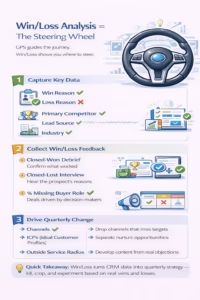
Win/Loss Analysis = The Steering Wheel.
If pipeline hygiene is your GPS, Win/Loss analysis is the steering wheel. It shows what’s actually working, where deals get stuck, and what needs to change in your process or messaging.
When done quarterly, Win/Loss turns your CRM data into strategy — helping you decide which channels to fund, which ICPs to target, and which habits to kill.
What to Capture (Required CRM Fields)
Make these required fields on deal close in Dynamics 365 or HubSpot:
- Win Reason: problem fit, security posture, compliance, speed, local presence.
- Loss Reason: status quo/no decision, price vs. value, incumbent vendor, timing, or lack of urgency.
- Primary Competitor: who you were compared against.
- Lead Source: where the deal originated.
- Industry / Vertical: context for fit and messaging.
- Deal Size: to track margin and ACV trends.
How to Collect Win/Loss Data
- Closed-Won Debrief (10 minutes): Confirm what solved the buyer’s problem, which proof points closed the deal, and what almost derailed it.
- Closed-Lost Interview (15–20 minutes): Capture the buyer’s words — why they didn’t choose you, what criteria mattered, and what would have changed their mind.
- No-Decision Quarantine: Separate these from true losses. They’re not failures; they’re nurture opportunities for reactivation.
Turn Insight into Action (Quarterly Routine)
Build a Commit / Kill / Experiment matrix for:
- Channels (which lead sources stay or go).
- ICPs (which industries convert best).
- Offers and messages (which proof points resonate).
- Update disqualification rules and stage exit criteria based on recurring loss themes.
- Create new marketing and sales content from real objections (e.g., “Why security add-ons aren’t optional for HIPAA clinics”).
Win/Loss analysis isn’t a report — it’s a decision engine. Every quarter, use it to tighten qualification rules, drop weak channels, and strengthen your MSP’s revenue playbook.
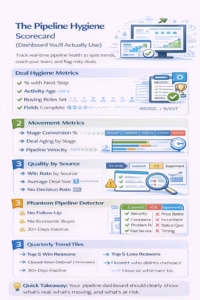
The Pipeline Hygiene Scorecard (Dashboard You’ll Actually Use)
A healthy pipeline is easy to inspect and impossible to fake. The Pipeline Hygiene Scorecard gives you a clear view of activity, movement, and deal quality — so you can coach your team based on data, not gut feeling.
Build this dashboard in Power BI or directly inside Dynamics 365 Sales Hub to get a real-time pulse of your funnel health.
Deal Hygiene Metrics
Track the essential behaviors that keep deals alive:
- % of deals with a next step scheduled
- Activity age (days since last logged touch)
- Stage age (time spent in each stage)
- Buying group mapped (decision-maker, influencer, champion)
- MEDDICC / BANT-lite completeness (key qualification fields filled)
Movement Metrics
Measure how efficiently deals flow through your funnel:
- Stage conversion % (Discovery → Validate → Propose → Commit)
- Deal aging by stage
- Pipeline velocity by segment (time from Opportunity to Win)
- Forecast accuracy (commit vs. actual revenue)
Quality by Source
Show which lead sources deliver consistent wins:
- Win rate by source (Referrals, Paid, SEO, Webinars, Partnerships)
- Average deal size and cycle time per source
- No-decision rate (how often prospects ghost after proposal)
Phantom Pipeline Detector
A quick CRM view to flag “dead” opportunities:
- Proposals sent with no follow-up scheduled.
- Deals without an identified economic buyer.
- Opportunities with no logged activity in 30+ days.
Quarterly Trend Tiles
Display simple visuals on your dashboard:
- Top 5 Win Reasons vs. Top 5 Loss Reasons.
- Competitive displacement ledger — which vendors you’re beating or losing to.
Your pipeline dashboard should tell a story — what’s real, what’s moving, and what’s at risk. If it takes more than five minutes to explain, it’s too complicated.
Stage Exit Criteria (Printable Table)
Stage discipline keeps your pipeline honest. Deals should only move forward when there’s evidence, not optimism. Clear exit criteria help reps qualify consistently, reduce “happy ears,” and make forecasting far more reliable.
Here’s a Stage Exit Table you can print or pin inside your CRM as a quick reference:
MSP Pipeline Stage Exit Criteria
| Stage | To Exit This Stage, You Must Have… | Proof / Evidence |
| Stage 1: Discovery | Documented pain, impact, seat count, compliance stakes, tech stack fit, and budget intent. Next meeting booked. | Discovery notes, meeting link, qualification fields completed. |
| Stage 2: Validate | Named champion, access to economic buyer, and agreed outline of business case. Security expectations mapped. | CRM notes + meeting summary logged. |
| Stage 3: Propose | Mutually agreed scope, timeline, and previewed commercials. Legal/security review plan established. | Proposal attached via CPQ or CRM. |
| Stage 4: Commit | Executive sign-off path confirmed, start date defined, and onboarding checklist agreed. | Signed quote/SOW or approval email saved. |
Exit Rule: No Evidence, No Progress
Reps cannot move a deal forward without proof — a logged note, attachment, or meeting reference. If it’s not documented, it didn’t happen.
This simple rule eliminates “phantom commits” and keeps everyone aligned on what’s real.
Stage clarity = forecast clarity. When every deal moves only with proof, your pipeline becomes a true mirror of your revenue reality.
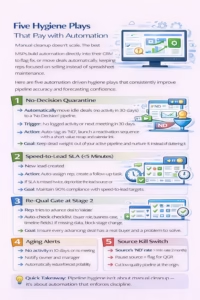
Five Hygiene Plays That Pay with Automation
Manual cleanup doesn’t scale. The best MSPs build automation directly into their CRM to flag, fix, or move deals automatically, keeping reps focused on selling instead of spreadsheet maintenance.
Here are five automation-driven hygiene plays that consistently improve pipeline accuracy and forecasting confidence.
1. No-Decision Quarantine
Automatically move idle deals (no activity in 30 days) to a “No Decision” pipeline.
- Trigger: No logged activity or next meeting in 30 days.
- Action: Auto-tag as “ND,” launch a reactivation sequence with a short value recap and calendar link.
- Goal: Keep dead weight out of your active pipeline and nurture it instead of cluttering it.
2. Speed-to-Lead SLA (<5 Minutes)
Response time drives conversion.
- Trigger: New lead created.
- Action: Auto-assign a rep, create a follow-up task, send an SMS alert, and record the timestamp.
- If SLA is missed twice, deprioritize the lead source or flag for review.
- Goal: Maintain 90% compliance with speed-to-lead targets.
3. Re-Qual Gate at Stage 2
Stop weak deals before they clog the funnel.
- Trigger: Rep tries to advance the deal to “Validate.”
- Action: Auto-check checklist (buyer role, business case, timeline fields).
- If missing data, block stage change, and prompt the user to complete the fields.
- Goal: Ensure every advancing deal has a real buyer and a problem to solve.
4. Aging Alerts
Catch slow-moving deals before they go stale.
- Trigger: No activity in 10 days or no meeting scheduled.
- Action: Notify owner and manager; automatically reduce forecast probability.
- Goal: Keep stage-aging under control and prevent false forecasts.
5. Source Kill Switch
Eliminate low-quality pipeline at the source.
- Trigger: Any lead source where the No-Decision rate > the Win rate for two consecutive months.
- Action: Pause campaign or lead routing until reviewed in QGR.
- Goal: Protect focus and budget by cutting what doesn’t close.
Pipeline hygiene isn’t about manual cleanup — it’s about automation that enforces discipline. Let your CRM do the policing, so your team can focus on deals that move.
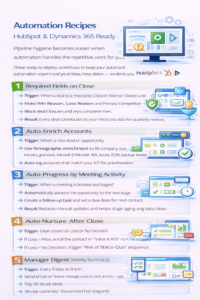
Automation Recipes HubSpot & Dynamics 365 Ready
Pipeline hygiene becomes easier when automation handles the repetitive work for you.
These ready-to-deploy workflows will keep your data clean, your deals current, and your team accountable — whether you use HubSpot or Dynamics 365.
1. Required Fields on Close
Trigger: When a deal is moved to Closed–Won or Closed–Lost.
- Make “Win Reason,” “Loss Reason,” and “Primary Competitor” mandatory fields.
- Block deal closure until reps complete them.
Result: Every deal contributes to your Win/Loss data for quarterly reviews.
2. Auto-Enrich Accounts
Trigger: When a new lead or opportunity is created.
- Use firmographic enrichment to fill company size, industry, and tech stack (Microsoft 365, Azure, EDR, backup tools).
- Auto-tag accounts that match your ICP for prioritization.
Result: Sales spends less time researching and more time selling.
3. Auto-Progress by Meeting Activity
Trigger: When a meeting is booked and logged.
- Automatically advance the opportunity to the next stage.
- Create a follow-up task and set a due date for next contact.
Result: Reduces manual updates and keeps stage aging data clean.
4. Auto-Nurture After Close
Trigger: Deal closed as “Lost” or “No Decision.”
- If Loss = Price, enroll the contact in “Value & ROI” nurture sequence.
- If Loss = No Decision, trigger “Risk of Status Quo” sequence.
Result: Reactivates quiet deals and repurposes lost opportunities.
5. Manager Digest (Weekly Summary)
Trigger: Every Friday at 8 a.m.
- Send email or Teams message with:
- Pipeline hygiene score (based on deal activity + age).
- Top 10 stuck deals.
- “At-risk commits” (forecasted but stagnant).
Result: Managers coach proactively instead of reactively.
- Pipeline hygiene score (based on deal activity + age).
Automate hygiene like you automate marketing. Every CRM field, follow-up, and report should work behind the scenes to keep your data — and your pipeline — clean.
Quarterly Win/Loss Review — 90-Minute Agenda
Your Quarterly Win/Loss Review (QWLR) is where data turns into direction. It’s a focused, 90-minute session that replaces guesswork with facts — showing your team exactly why you win, why you lose, and how to adjust your focus for the next quarter.
Here’s how to structure it for clarity and impact.
Pre-Work (Before the Meeting)
- Sample 20–30 deals from the past quarter (a mix of Wins, Losses, and No-Decisions).
- Include deals from all primary sources and industries.
- Collect buyer interview notes or feedback surveys (anonymized).
- Prepare Power BI visuals that show hygiene scores, conversion rates, and the top Win/Loss reasons.
90-Minute Agenda
| Time (Minutes) | Topic | Focus Questions |
| 0–10 | KPI Snapshot & Hygiene Score | What changed since last quarter? Which stages improved or regressed? |
| 10–30 | Win Patterns | Which personas, pain points, or channels drive the most wins? What proof content closed deals fastest? |
| 30–55 | Loss Patterns | Where do we lose — pricing, timing, competition, or fit? What objections keep repeating? |
| 55–75 | Channel ROI Review (Commit / Kill / Experiment) | Which lead sources deserve more budget? Which should be paused or tested differently? |
| 75–90 | Action Plan & Assignments | Update stage criteria, disqualify rules, content backlog, and assign DRIs with deadlines. |
Output:
- 1-page decision log summarizing key takeaways, next-quarter priorities, and assigned owners.
- A 30-day RevOps action plan uploaded to Jira, Asana, or your CRM project hub.
The Win/Loss Review isn’t a blame session; it’s a growth engine. Every quarter, it shows you where to focus, what to fix, and how to fund what’s working.
Content and Collateral to Fix Loss Reasons
Your Win/Loss analysis should feed your content strategy. Every recurring “loss reason” is a marketing opportunity — a signal to build assets that remove hesitation, prove value, or differentiate your MSP from the pack.
Here’s how to turn those insights into material that wins deals before sales ever get on a call.
Objection Handlers (for Common Loss Themes)
| Loss Reason | Fix with This Content |
| “Too expensive” | Create a security cost vs. risk calculator or one-pager comparing downtime costs to managed services fees. |
| “Afraid to switch providers” | Publish an onboarding roadmap and “what to expect in your first 30 days” guide. |
| “We’re happy with our current IT team” | Build a side-by-side feature comparison or “top 5 missed risks with incumbent MSPs” article. |
| “Unclear ROI” | Use Power BI dashboards or customer case studies showing measurable MRR impact. |
| “Security concerns” | Share industry-specific security posture briefs (HIPAA, legal, financial compliance). |
Proof Assets (For Middle to Late Funnel)
- Vertical case studies: Healthcare, legal, manufacturing, and professional services.
- Security one-pagers: Clearly outline your stack and certifications (EDR, MDR, Azure AD).
- Onboarding timeline: Visual step-by-step of what happens post-signature.
- ROI calculators: Interactive, self-service tools comparing managed vs. reactive costs.
Middle-Funnel Assets (Reinforce Value Mid-Cycle)
- CIO-ready proposal templates with metrics and timelines.
- Short demo clips or walk-through videos tied to specific objections.
- Email proof series using client outcomes and quantified results.
Your Win/Loss data tells you exactly what content to create. If “price” keeps appearing as a loss reason, don’t discount document your value.
Templates and Checklists (Downloadables)
You don’t need to reinvent your pipeline hygiene process; you just need to standardize it. These templates help you embed structure and accountability into your sales system so every rep, stage, and review follows the same playbook.
Win/Loss Interview Script
Use this for both Closed-Won and Closed-Lost interviews.
- Format: 10–20 minutes via Zoom or call.
Questions to Ask:
-
- What problem were you trying to solve?
- Why did you choose us / not choose us?
- Who else did you evaluate?
- What almost changed your mind?
- What could we have done differently?
- What problem were you trying to solve?
- Follow-Up: Summarize key insights in CRM within 24 hours.
Reason Taxonomy (CRM Picklists You Can Paste)
Standardize Win/Loss reasons to make reporting actionable.
- Win Reasons: Speed, Local Presence, Security Posture, Price-Value Fit, Responsiveness, Partner Recommendation.
- Loss Reasons: No Decision, Price, Timing, Incumbent, Security Concerns, Compliance Fit, Internal IT Team.
- Competitor Field: Include top 5 competitors for dropdown selection.
Pipeline Hygiene Scorecard (Dashboard Spec)
Each sales manager should see at a glance:
- % of deals with next step scheduled
- Deals inactive >14 days
- Stale pipeline ratio
- Win vs. Loss vs. No-Decision rate.
- Average cycle time and ACV per source
30/60/90-Day Cleanup Plan
| Phase | Focus Area | Action Items |
| 30 Days | Data Hygiene | Archive dead deals, assign missing owners, tag sources |
| 60 Days | Stage Criteria | Enforce “no evidence, no progress” rule |
| 90 Days | Optimization | Launch automation (aging alerts, no-decision quarantine) |
Stage Exit Table (Printable Reference)
Keep a laminated or digital version of the stage exit criteria beside every rep.
Include the “proof required” column and use it during 1:1s and QGRs to coach consistency.
Quick Takeaway:
Templates create predictability. When everyone qualifies, advances, and reports the same way, your pipeline stays clean even when the team grows.
FAQ (Snippet-Ready)
Q1: What’s the difference between “Lost” and “No Decision”?
Lost means the buyer chose another provider or solution.
No Decision means they stayed with the status quo, no action taken.
Treat “No Decision” as a nurture opportunity, not a failure. Feed these into reactivation workflows and monitor conversion over time.
Q2: How often should we clean the pipeline?
- Weekly: Light scrub, remove duplicates, update notes, check for missing next steps.
- Monthly: Deep review check activity age, close stale deals, refresh forecasts.
- Quarterly: Full reset during your Win/Loss Review to redefine qualification rules and stage criteria.
Q3: What’s a good hygiene benchmark for MSPs?
Use these as your baseline targets:
- ≥ 85% of deals have a next meeting booked.
- ≤ 25% stale pipeline ratio (no movement 30+ days).
- ≤ 10% missing buyer role.
- Declining No-Decision rate quarter over quarter.
These metrics reflect a pipeline that’s both active and accurate.
Q4: Do referrals always convert better?
Not always. Referrals often close faster because trust is pre-established, but they can stall without an executive sponsor or compliance urgency.
Track referral performance in your CRM by cycle time and deal size — some referral cohorts shrink over time without structured follow-up.
Cleaning your pipeline isn’t about removing data; it’s about revealing the truth. Regular hygiene, structured reviews, and intelligent automation turn chaos into clarity.
A clean pipeline doesn’t just help you sell better; it helps every part of your MSP grow smarter. Build it once, automate it thoroughly, and revisit it quarterly. That’s how you turn your sales process into a true growth engine.
Book your MSP Growth Assessment and learn how Empellor CRM’s playbooks, dashboards, and Win/Loss systems can make your pipeline your most predictable revenue driver.
Because CRMShouldntSuck — it should sell, renew, and forecast for you